If they clicked on forgot password they should get an email from no-reply@nforma.com.au with the new temp password . Did they check in their JUNK folder. Also it can take up to 10 mins before they receive the reset password email. So try not to press it too many times otherwise they may get multiple password reset emails that has expired as another one was sent.
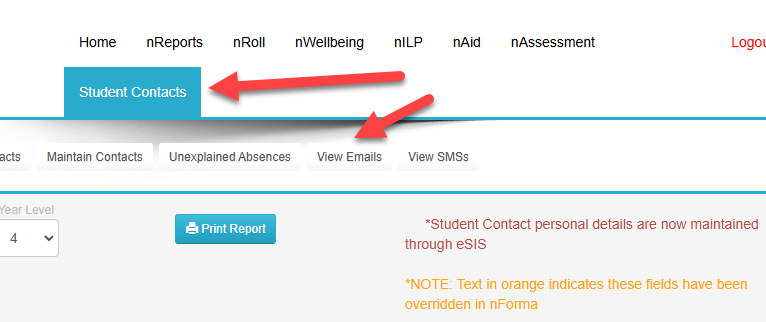
To check if the email was sent, go to "Student Contacts" -> "View Emails"
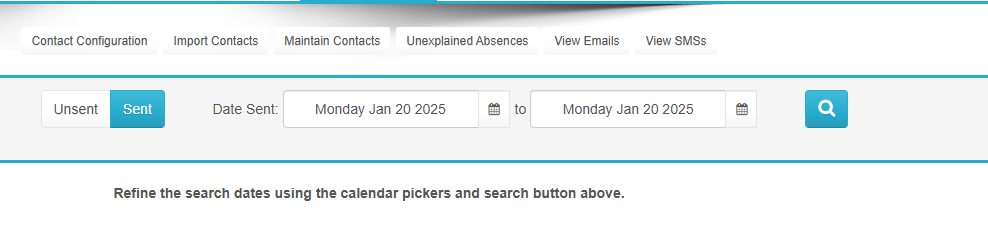
Select the date to view and click SENT if nothing is listed under UNSENT
Click VIEW
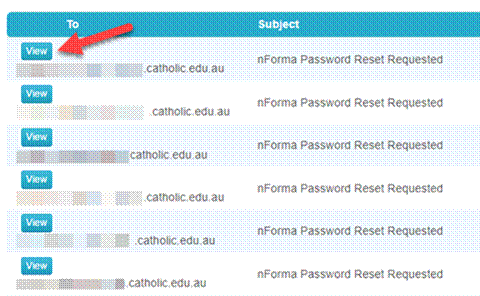
You can then copy and paste the email content and send using your email program. Admin will also have access to the temporary password, so the admin can reset and change the password on their behalf as well.
Was this article helpful?
That’s Great!
Thank you for your feedback
Sorry! We couldn't be helpful
Thank you for your feedback
Feedback sent
We appreciate your effort and will try to fix the article