Sometimes staff members might encounter issues with not receiving the reset email. Here's a more detailed breakdown of how you can manually retrieve the temp password:
Verify the email issue: First, ensure the staff member has checked their spam or junk folder for the email from
no-reply@nforma.com.au. Sometimes, email filters can mistakenly categorize legitimate messages as spam.Log in to nForma
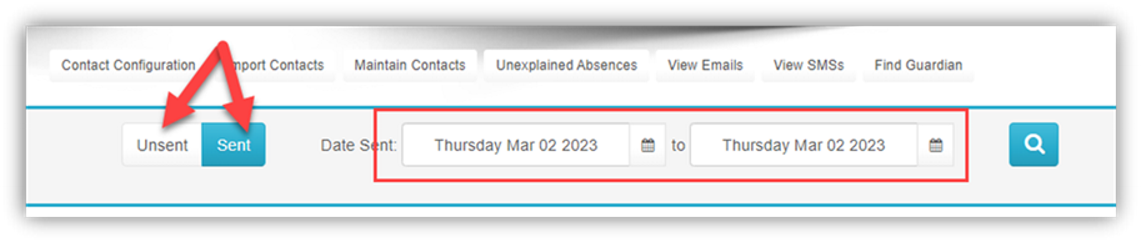
Navigate to "Student Contacts"

View emails

Select the date to view and click SENT if nothing is listed under UNSENT
Click VIEW
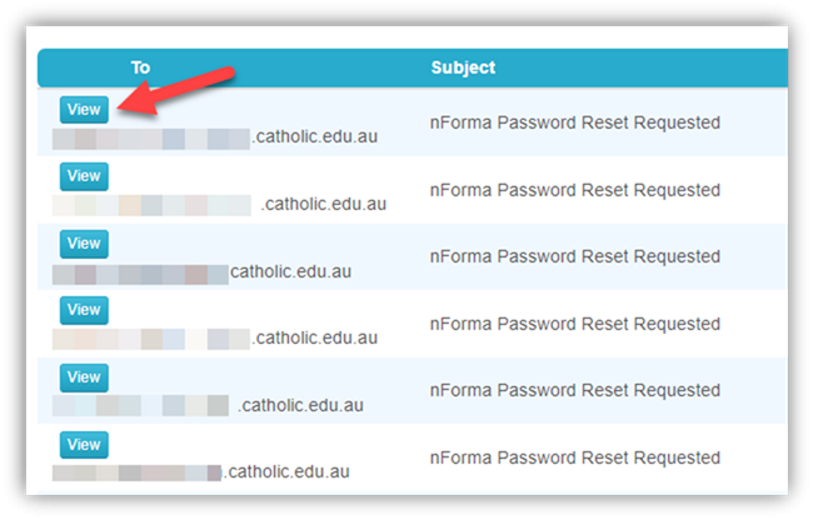
Check the content. You may test by logging in as the user as all the details are there and if all works after you enter a new password, RESET their password again to send another updated email for them to try. Or copy and paste the email content and send using your email program.
Was this article helpful?
That’s Great!
Thank you for your feedback
Sorry! We couldn't be helpful
Thank you for your feedback
Feedback sent
We appreciate your effort and will try to fix the article