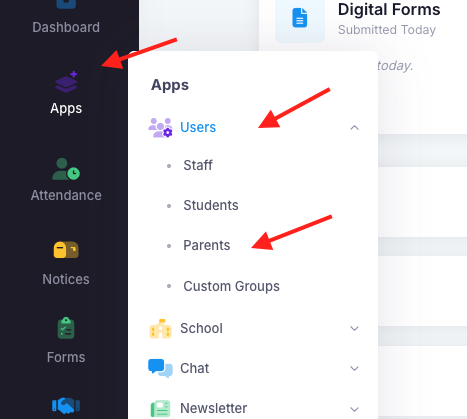
Some parents may inform a school that they never received an email to reset their password. Admin have the ability to send the parent a temporary password if they did not receive the email. To manually reset a parent password, go into "Apps", "Users" then "Parents".
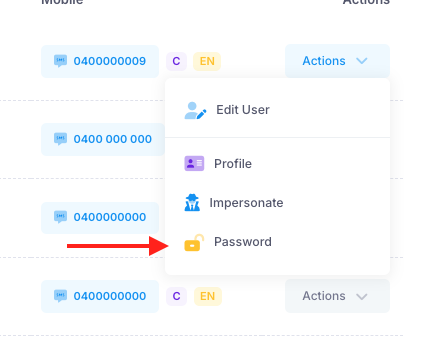
Once there, type the parents name or email in the search bar. Once the parent appears, click on "Actions" and then "Password".
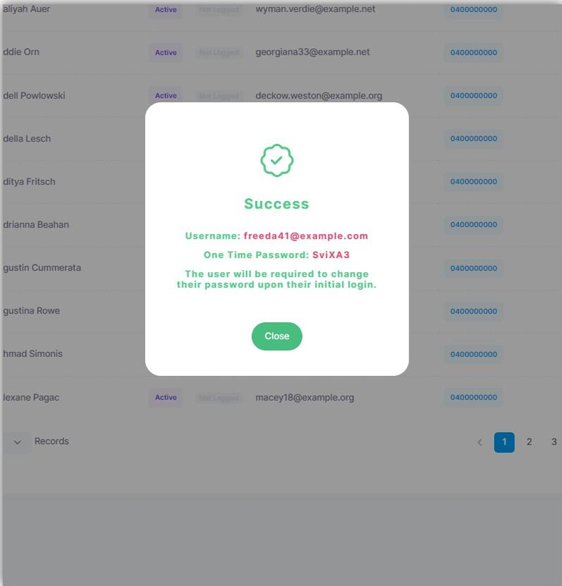
You will then be presented with the user's new temporary password and email address that is linked to nForma. Copy the text and send the information to the parent. They will then be able to reset their password. The temporary password will last for around 2 hours.
Was this article helpful?
That’s Great!
Thank you for your feedback
Sorry! We couldn't be helpful
Thank you for your feedback
Feedback sent
We appreciate your effort and will try to fix the article