In order to add the ability to score a domain (e.g. 1.5, 2 etc), within a subject that has already been created and added to the STUDENT REPORT LAYOUT, there are 3 steps involved.
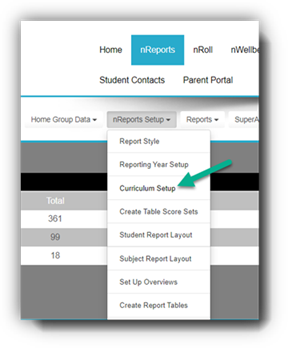
STEP 1: Go to nReports> nReports Setup and select Curriculum Setup
Find the subject you require to add the VC dots to by clicking on the grey drop box. If nothing expands, it means there is no domain added to the subject.

To add a domain, click on the “plus” sign to the right.

Select Victorian Curriculum and then the required domain. Press OK
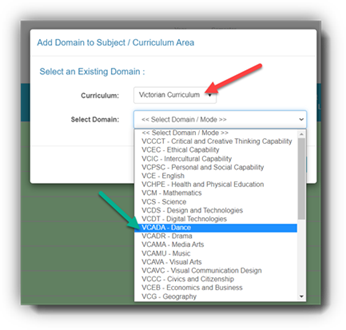
The added domain will now appear under the subject header.
This now gives us the option to add scores to the subject “The Arts”.

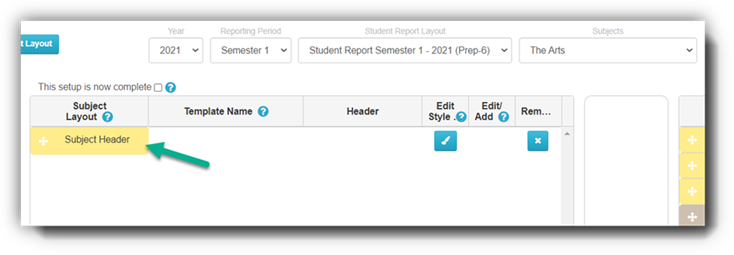
STEP 2: In order for teachers to be able to add VC scores to the Dance domain, we must check in SUBJECT REPORT LAYOUT
At the moment only a HEADER exists for The Arts.
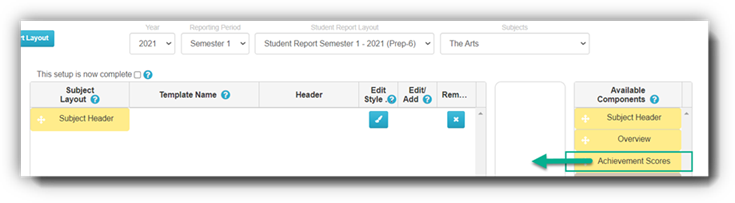
We must now add the Achievement Score tile. This can then be assigned to the teachers who will be required to assess the domain Dance, for The Arts.
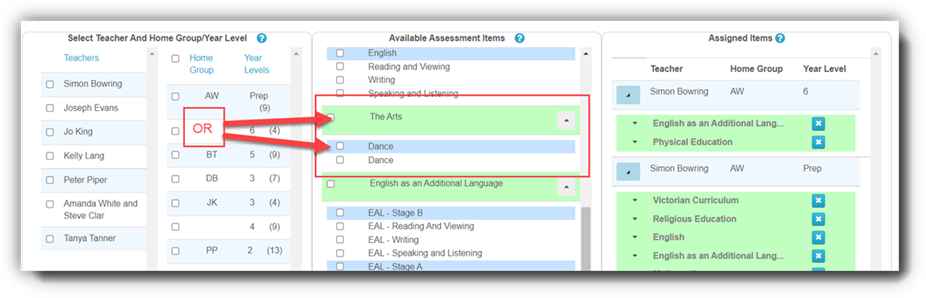
STEP 3: Now we can assign Dance to the teacher(s) in Assign Teachers
Was this article helpful?
That’s Great!
Thank you for your feedback
Sorry! We couldn't be helpful
Thank you for your feedback
Feedback sent
We appreciate your effort and will try to fix the article