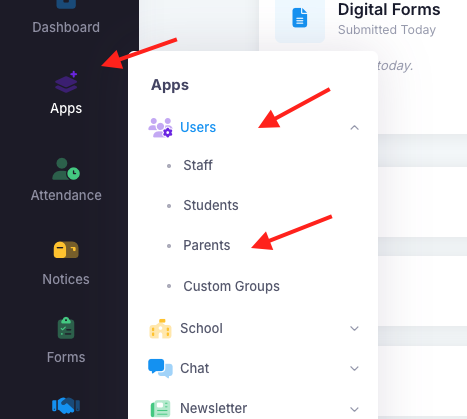
The impersonation tool allows the school to view exactly what is available in a parent account. It is a helpful tool when trying to identify an issue. For example, a parent may inform the school that they are unable to see their child's reports. You can confirm this by going into the parent account, selecting the student and the clicking "view reports". If you can see the report then you know that it is an issue with the user's browser. If you too are unable to see the report, then you know there is an issue with how it was uploaded. To impersonate a parent, go into "Apps", "Users" then "Parents".
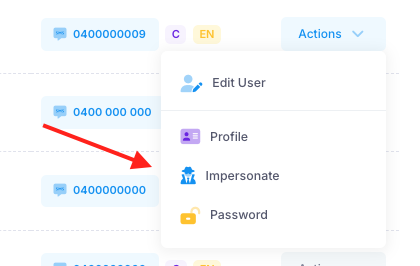
The detective icon is the button to impersonate a parent.
Was this article helpful?
That’s Great!
Thank you for your feedback
Sorry! We couldn't be helpful
Thank you for your feedback
Feedback sent
We appreciate your effort and will try to fix the article