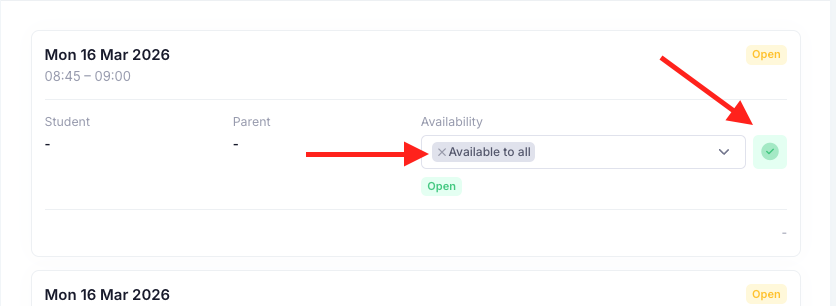
Yes, if a teacher is unable to attend a slot, the slot can be removed for their students. To do this, go into the Connect, click on "Actions" then "View". Here, find the slots that the teacher is unable to attend. Click on the "x" next to "Available to all" and select the required students that you do not want to book in. Once done, click on the green tick to save the changes. Repeat the process for all required slots.
Note: If you try and "regenerate all slots" after applying blocks to a slot, you will receive an error. To proceed, you will need to make all slots "available to all" and then regenerate. Once done, you can re-apply the block to those students.
Was this article helpful?
That’s Great!
Thank you for your feedback
Sorry! We couldn't be helpful
Thank you for your feedback
Feedback sent
We appreciate your effort and will try to fix the article