Question: How soon should I request my data from Operoo?
Answer: At the latest, the beginning of the last week of Term 4 2025.This will give us a few days into December to follow up any issues that may arise. But please do not send your end date as the last day of school, 19th December, as it may cut over into the Christmas break and if we need support from Operoo with your data, we may not have access to them.
Question: Who do I contact for my data?
Answer: Patrick Nickholds, Operoo Customer Success Manager, at patrick.nickholds@schoolstatus.com
Question: What files do I send to nForma?
Answer: You will receive multiple files consisting of CSV, PDFs etc. Store them on your server, or somewhere secured for future reference should you need to verify an item (e.g. court case).
Find out which version you use for Operoo: Community or Group edition.
Upload only the required files as per instructed below.
INSTRUCTIONS
1. Log in as you normally would to access the portal.
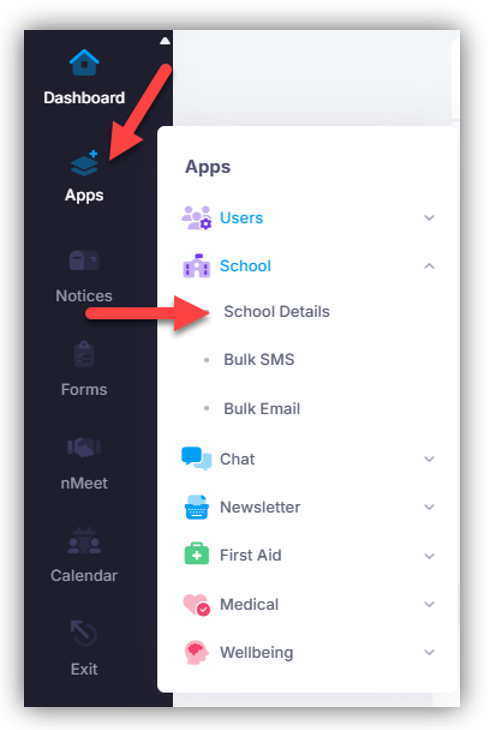
2. Click on APP> School Details
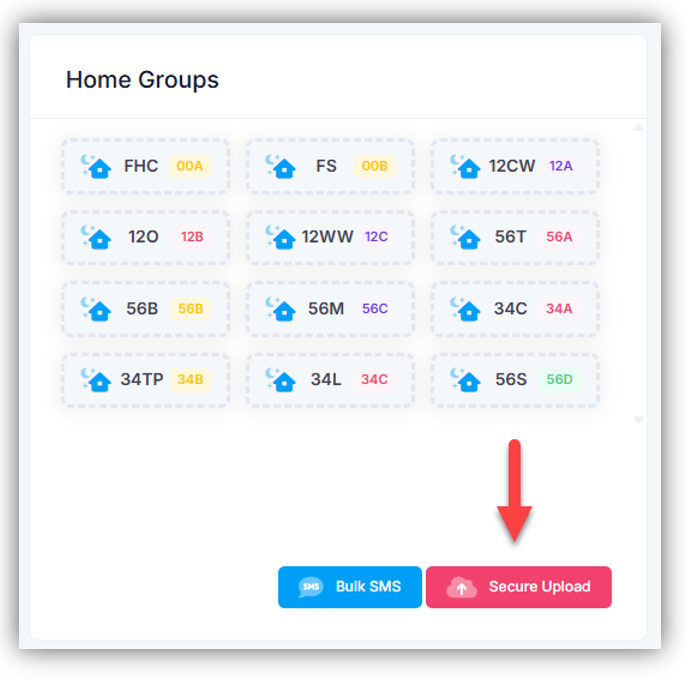
3. Click on SECURE UPLOAD
4. Locate the Operoo file(s) required and upload as instructed.
5. The only CSV files we need that are related to medical data, are the ones that have these prefix names:
"Profile-contact…".csv
"Profiles-….".csv
"Safety-alerts…".csv
If the above files are empty (0Kb), then look for the files that have "sims_profile...".csv and the file size should not be 0Kb.
NOTE:
- Do not upload the files as zipped files. Unzip them and then upload. I believe you need "7-ZIP" to extract. Request support from your IT technician if you are unsure
- Only 20MB maximum per upload. If required upload in batches.
6. As prompted, please send an email to support@nforma.com.au to inform us that you have completed the upload process.
7. nForma Support will be in touch once your data has been imported into nForma PORTAL.
Was this article helpful?
That’s Great!
Thank you for your feedback
Sorry! We couldn't be helpful
Thank you for your feedback
Feedback sent
We appreciate your effort and will try to fix the article