Marking a family as separated must be done manually in the nForma portal. To do this, go into "Apps", "Users" and then "Students".
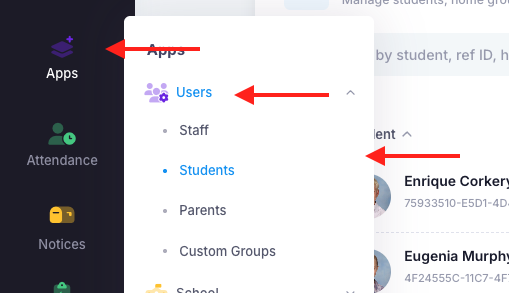
Once there, search for the student. Click the left tick box next to their name and then you should see a blue "Actions" button appear at the top right of the page. Click on that and select "Split family".
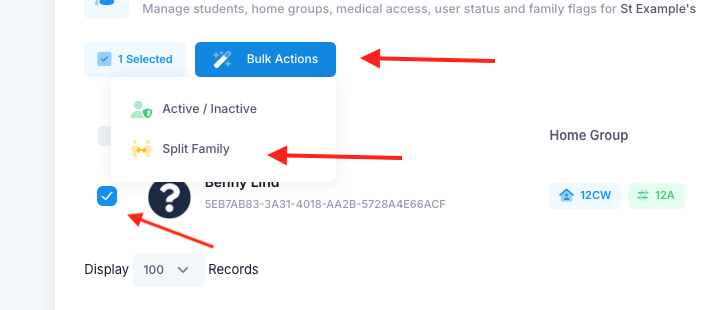
Once done, you should see a yellow figure appear underneath the column "SPLIT".

Note:
This process must be applied to all students in the family individually.
The split flag will impact the following modules:
- Medical
- Will only show the logged in parents' details
- If there are additional contacts listed, eg. aunt, uncle, they will display for both. If you also want to restrict their data, you will need to change their relationship. For example, if mum has added aunt, change aunt's relationship from aunt to mother and then in the name add (aunt).
- nMeet
- Both parents can book separate nMeet sessions
s
Was this article helpful?
That’s Great!
Thank you for your feedback
Sorry! We couldn't be helpful
Thank you for your feedback
Feedback sent
We appreciate your effort and will try to fix the article