All Home Groups are set in ICON with an individual code. Schools have the ability to rename a Home Group so that it is unique to the school. To change a home group name in nForma follow these steps.
1. Go into "Assign teachers to home group"
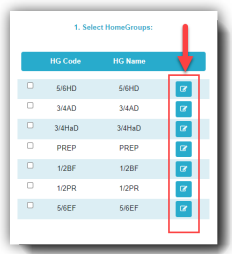
2. Click on the edit icon to rename a Home Group
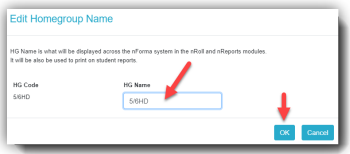
3. Enter the new name and click OK
Was this article helpful?
That’s Great!
Thank you for your feedback
Sorry! We couldn't be helpful
Thank you for your feedback
Feedback sent
We appreciate your effort and will try to fix the article