It's best to have 1 login and you share the login. While one is entering data the other can still login and see the information but will not change/add until the other has given the OK. Each teacher takes turns logging in to do the reports upon their own negotiation. They can have both names appear on the front cover of the reports. This is done via HOME> Assign Teachers to Home Group.
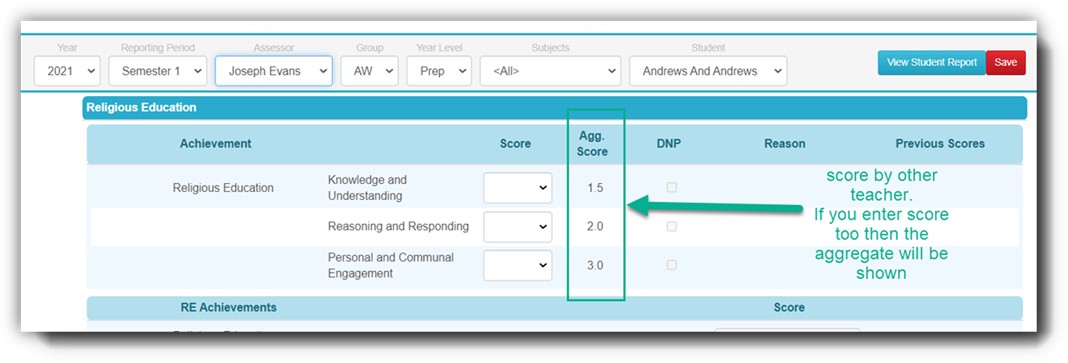
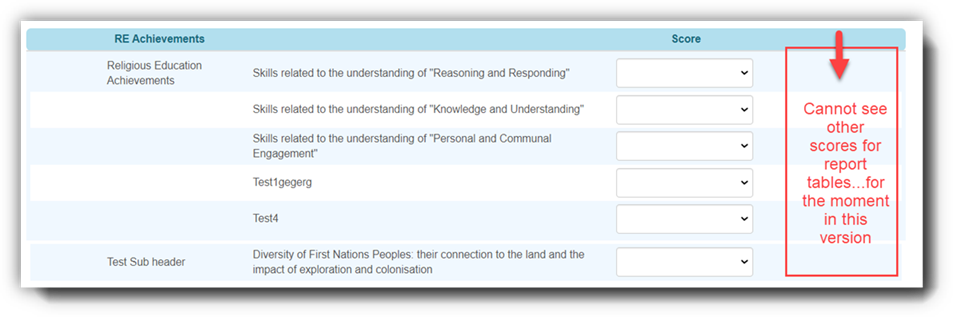
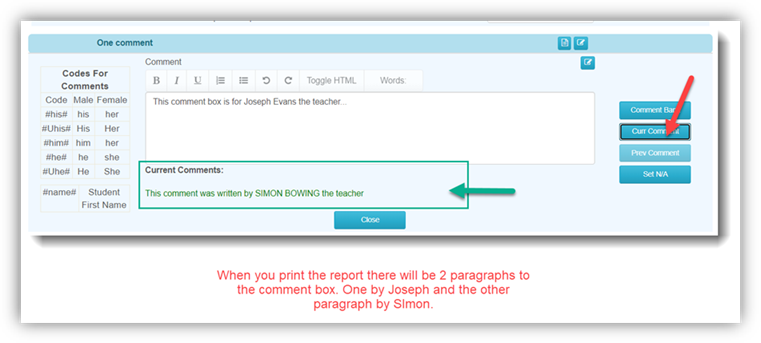
The more “complex” way is to assign both teachers identical subjects. But one teacher can focus on Maths while the other on English etc. Both can see what the other has entered depending on the data entry form you choose. This works only in STUDENT DATA in the current version of nForma. Teachers cannot see the other teacher’s scores under Home Group Data>Home Group Score Assessment. But they can see comments entered by the other teacher under Home Group Comments.
These are some examples:
Student Data Entry form- VC scores
Report Tables
Student Data Entry form- Comments
Was this article helpful?
That’s Great!
Thank you for your feedback
Sorry! We couldn't be helpful
Thank you for your feedback
Feedback sent
We appreciate your effort and will try to fix the article